What it actually is
A local app that hands your clips to Claude Code and lets you direct the edit in sentences, the way you would brief a human editor.
- ~50c
- Claude usage per one-minute video
- ~30 min
- Of work for that video
- 0
- API keys to set up
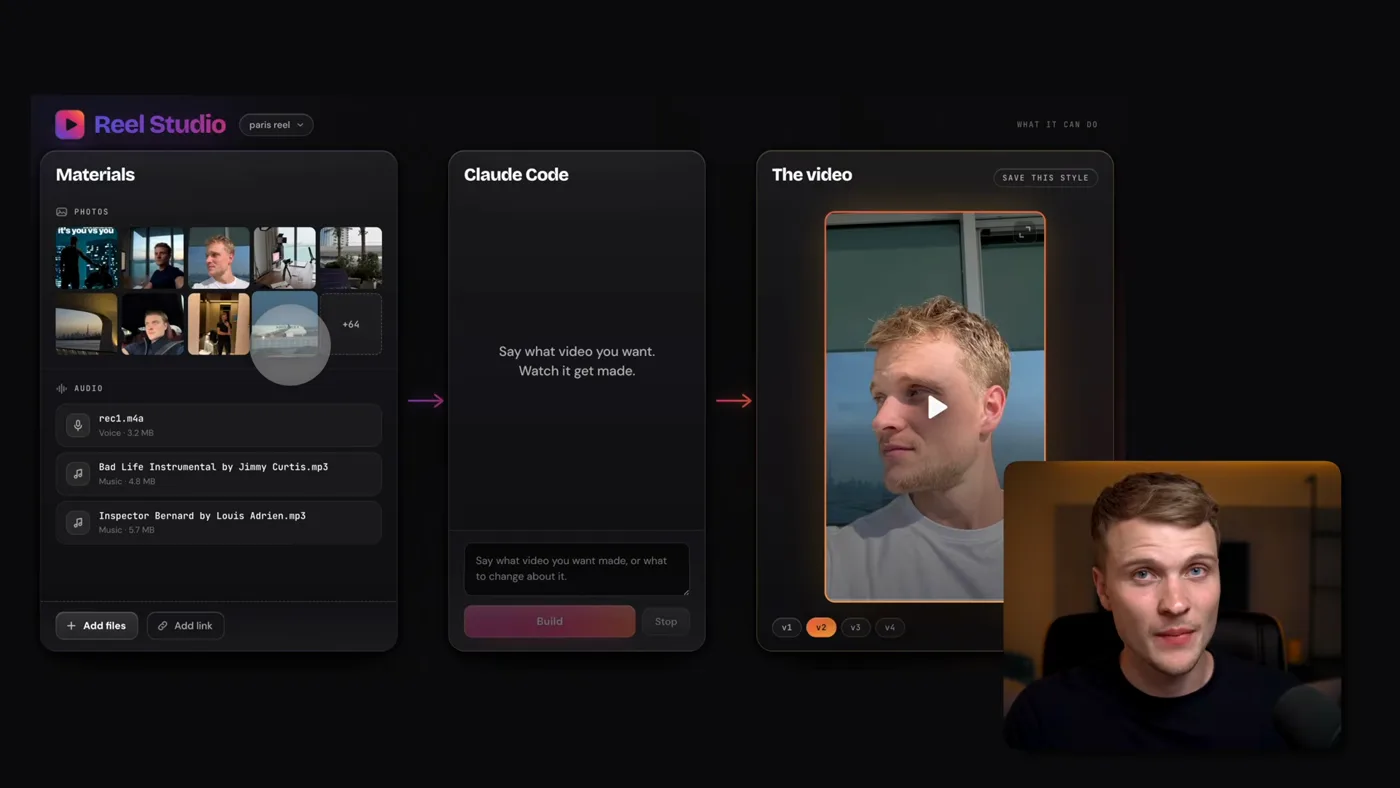
Three panels. Left: everything you have. Clips, photos, a voiceover, music, dropped in unsorted. Middle: a sentence saying what you want. right: the edited video.
The thing that makes it work is the part you do not do. You never describe your footage. It watches every clip, works out what is in it, transcribes anything spoken, and decides which two seconds of a thirty-second take are the ones worth keeping.
So the instruction can be as short as "make a good video out of these", and that is a genuinely different interaction from every template-based editor, where you are still the one deciding what goes in slot three.
Two videos it made, and how
A storytelling reel about moving to paris. I gave it a pile of photos, a few music files and a voiceover, and said: use the voiceover as the storyline, stitch the visuals so they make sense against it. It matched the b-roll to what was being said, beat by beat. Photos in that example, but video works the same way and it cuts the parts that are not relevant.
A product ad from a single link. The materials panel contained one thing: a URL to a landing page for a travel-day tracking app. It read the site, pulled the screenshots, the visual style and the real reviews, and built a motion-graphics ad out of them. One prompt, no assets.
The honest quality line
This is not the standard of a top-tier editor and I would not pretend it is. The comparison that matters is not against a great editor, it is against the video you were not going to make because you could not afford one or did not have two hours. Against that, it is not close.
What a video costs, and how many you get
The surprising part: No API keys. The editing framework underneath is hyperframes from heygen, which is open source and free. Everything runs inside Claude Code, so you are spending plan usage rather than paying a separate bill.
- Cost per one-minute video
- About 50 cents of Claude usage
- Time per one-minute video
- About 30 minutes, scaling with length
- Extra APIs
- none
- The framework
- Hyperframes, open source, free
Because you are spending plan usage, the real question is how many videos a plan buys. Roughly:
| plan | Videos per month | in practice |
|---|---|---|
| Pro, $20 | 20 to 32 | Three to five a day against the daily limits |
| $100 tier | 50 to 160 | Comfortable for a serious posting schedule |
| Largest plan | 200 to 320 | agency volume |
Videos per month
- Pro, $20
- 20 to 32
- $100 tier
- 50 to 160
- Largest plan
- 200 to 320
in practice
- Pro, $20
- Three to five a day against the daily limits
- $100 tier
- Comfortable for a serious posting schedule
- Largest plan
- agency volume
Ranges, not quotas: a complex video with lots of motion graphics costs several times a simple photo reel.
Using it
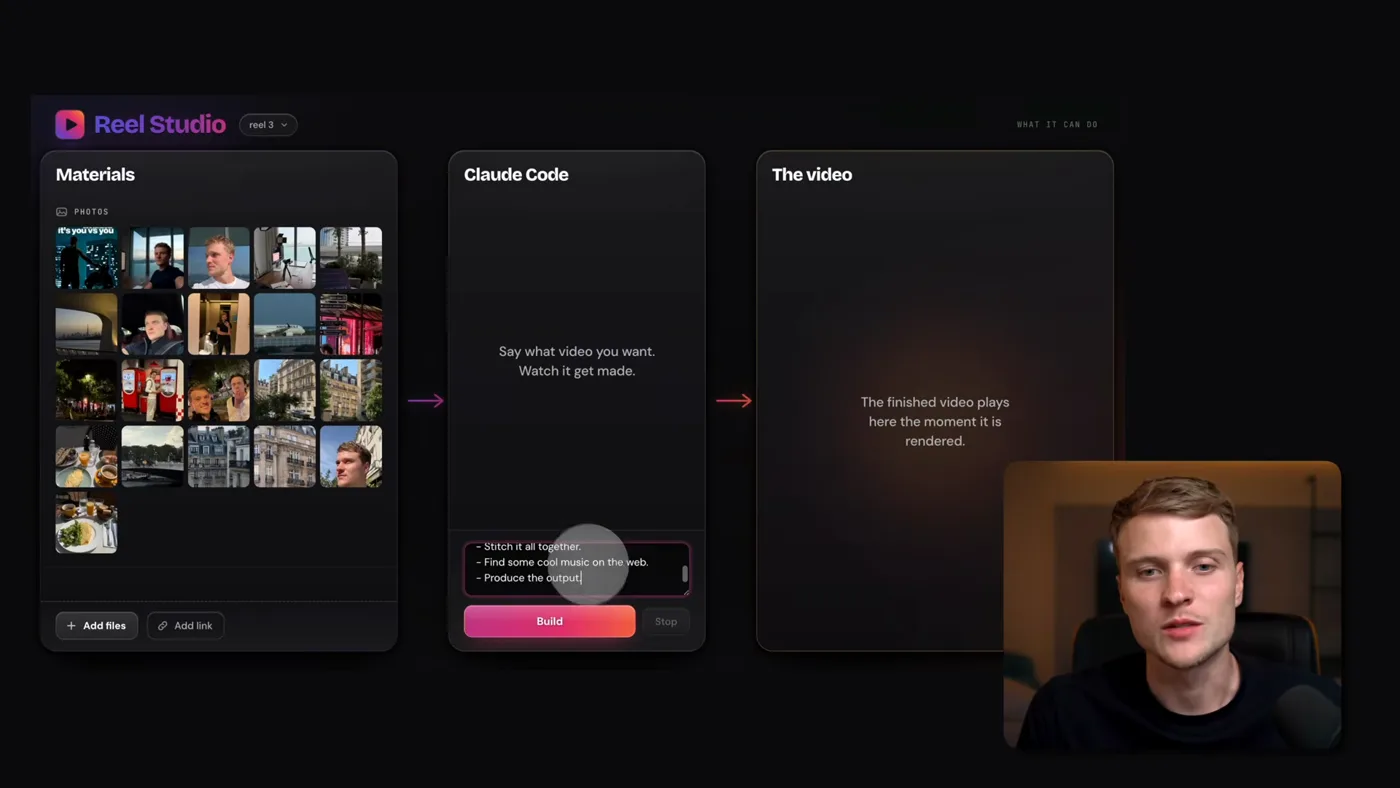
1Start a new reel and drop the materials in
Press new reel and put everything you have on the left: clips, photos, a voiceover, music. No order, no labels, no naming convention.
You do not describe what any of it is. It watches each file, works out what is in it, transcribes what is said, and decides where it belongs. That is the part that makes this different from a template tool.
2Say what the video should be, in a sentence
The middle panel takes plain english. "make a video about my trip to paris from these visuals, use the voiceover as the storyline, find some music, stitch it so it makes sense."
You are briefing an editor, not operating an editor. What to make, not which cut goes where.
3Press build and go and do something else
A one-minute reel takes about thirty minutes. You can watch every step in the middle panel, and you should not.
This is the whole deal: it is slower than a human editor at the keyboard and it costs about fifty cents, and neither of those matters because you are not in the room.
4Review v1 and give feedback in words
You get v1. Watch it, type what is wrong ("the cut at eight seconds is too early", "captions are too big"), and it produces v2. Then v3. Every version is kept.
This is the correct mental model for the whole thing: it is a first draft from an editor you are giving notes to, not a render you either accept or throw away.
5Nail the style on five seconds before you build the whole thing
The highest-value habit here. Ask it to edit only the first five seconds and give you four variations of the caption style, the font, the music.
Pick one, then build the rest. Iterating on five seconds costs almost nothing. Discovering you hate the captions after a thirty-minute render costs thirty minutes.
6Save the style so you never re-explain it
When a video finally looks right, press save this style. It reads back the fonts, the motion graphics and the general feel and stores them as a skill.
Every video after that starts from your look instead of from nothing. This is what turns a good afternoon into a system: you pay the styling cost once.
The four things that make the output good
The difference between people who get something postable and people who give up is these four, and none of them are technical.
- Style five seconds before you build sixty. Ask for four variations of the opening: font, caption style, music. Pick one. Then build. This saves more time than everything else here combined.
- Save the style when you like it. One button. It becomes a skill and every future video starts from your look rather than from default. You pay the styling cost once.
- Expect versions, like with a person. V1 is a first draft. Give notes, get v2. Anyone expecting the first render to be finished is going to be disappointed by a human editor too.
- Ask it when you are stuck. The app is running inside Claude Code. "how do I use a saved style" gets an answer in fifteen seconds, which is faster than asking me in the comments.
What it is not
- Not fast. Thirty minutes a minute of video. Design your day around that, do not fight it.
- Not a replacement for a great editor. It is a replacement for not making the video.
- Not a script writer. It cuts the video. What to say is a different job, and The reels research system is the one that does it.
- Not free of a plan. Pro or higher. The free Claude account cannot run Claude Code at all.
- Not unlimited on Pro. Three to five videos a day is the honest ceiling there, which is plenty for one person and not enough for an agency.
If you want the other half, deciding what the video should be about, that is The reels system, and the account-level strategy is on The growth guide. Never used claude code? Start here, and This is what the plans cost.