Oleg MelnikovYouTube
free resource

Claude Code content creation system

Produce weeks of social media content with custom visuals: infographics, carousels, personal images, all from a single prompt. Works for LinkedIn, Instagram, X, and more.

Jump to the setup steps or read the whole thing in writing.

23K views10:25 longPublished Mar 2026

Setup guide

Download and install VS Code from code.visualstudio.com. It auto-detects your OS.

Run the installer and verify VS Code launches properly.

What one command actually produces

One command turns your context folder into ten finished LinkedIn posts, each with its own generated image, in about seventeen minutes.

10+
Finished posts per command
~17 min
End to end, mostly image generation
1
Command to start it
Not a text post with a stock photo. The infographic is generated with the post, in the brand's own colours and type.

One line, create 10 posts, and about seventeen minutes later there is a dashboard with more than ten finished pieces of content in it. Not outlines. Finished: copy plus the visual, ready to publish.

The mix I use, which is just a sentence in the prompt:

  • Four posts with a personal photo, chosen from your own library to fit what the post says
  • Four AI infographics in your brand colours and type
  • Two carousels, for Instagram or LinkedIn

That is roughly two to three weeks of posting, and every one of them is built on what is actually working in your niche this week rather than on what the model assumes.

Why this is not ChatGPT with extra steps

This is the honest question and it has a specific answer. A chat window can write you ten posts right now. It cannot:

  • See what is trending in your niche this week. That needs a scraper, and platforms block direct scraping, which is why Apify exists.
  • Put your face in the image. That needs a photo library it can look through and an image model it can call.
  • Hand you a dashboard. That needs somewhere to write files and the ability to build the page.

Claude Code does all three because it has a folder and can call other services. The difference is not writing quality. It is that one ends with text you then have to act on, and the other ends with the posts.

The folder is your employee's brain
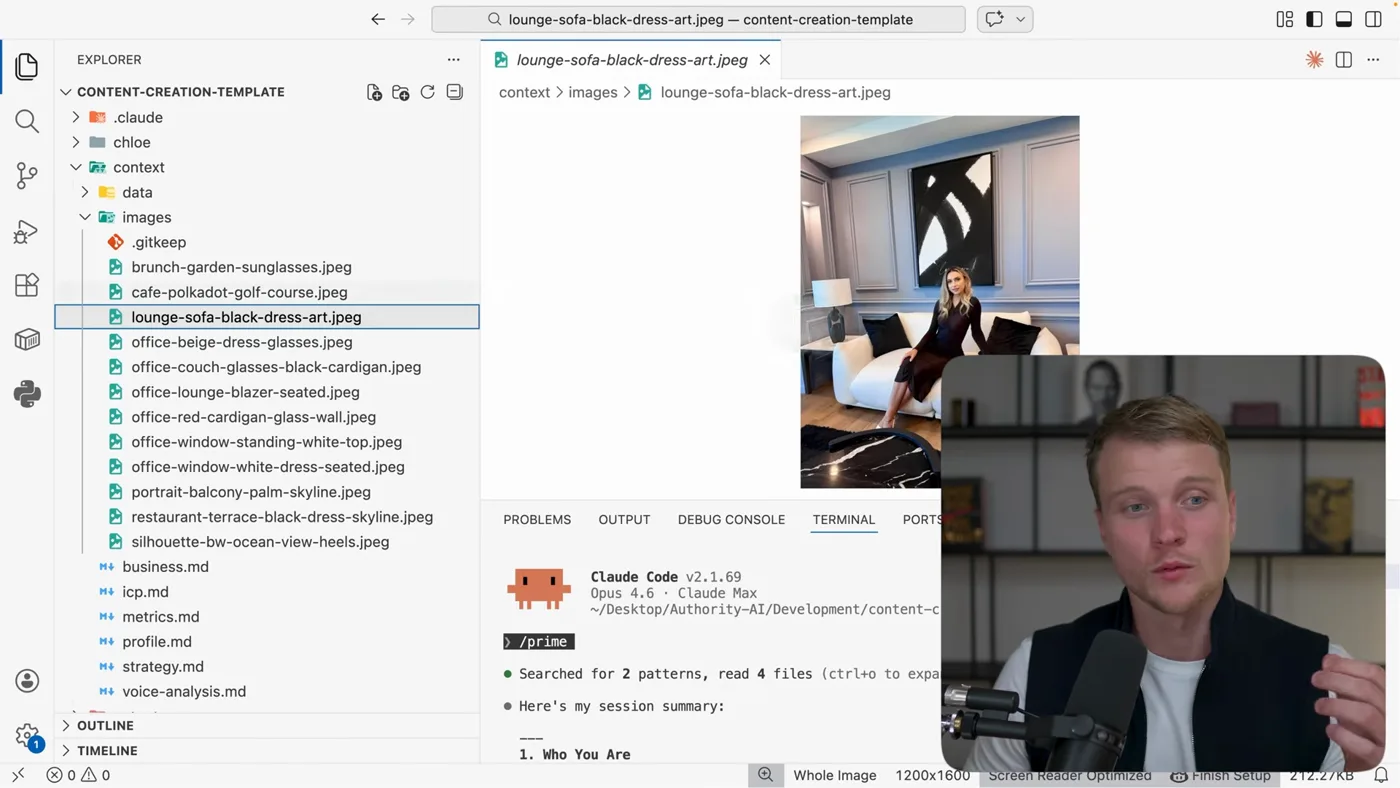
Every photo you own, described. This is the file that decides whether the right picture ends up on the right post.

The project has folders you will mostly never open, and it is worth knowing what they are, because they are the reason the output is specific rather than generic. Think of it as the brain of a content person you just hired:

Context/
Who you are, who you sell to, what your existing posts did
Context/images/
Your own photos, named descriptively so the right one gets picked
Reference/
One or two images showing the visual style you want
Examples/
Copy worth imitating, as a tone reference
Skills/
Instructions for specific jobs: writing hooks, building carousels, replicating what went viral

You interact with none of this. You type in the chat. The folders are what makes the chat worth typing in.

Setting it up

  1. 1Open the template and start Claude Code

    Download the template, open the folder in VS Code (file, then open folder), open a terminal, and run claude. That is the whole install.

  2. 2Add two API keys

    Open .env and paste two keys: Apify for scraping what is trending, and an image model key (i use kie.ai) for the visuals.

    APIFY_API_KEY=...
    KIE_AI_API_KEY=...

    Both take about a minute to get. These two keys are the difference between a chat that describes a post and a project that produces one.

  3. 3Let it learn who you are

    Point it at your own profile and let it read your existing posts. On the account I set up in the video it pulled 600 posts and took about six minutes.

    This is what stops the output being generic. It is not learning to write, it is learning what you write about and how your audience responds.

  4. 4Add your photos and one reference face

    Drop your photos into context/images/. Include one clear shot of your face named me.jpeg.

    Then ask it to catalogue them:

    i added images to context/images.
    rename them to something descriptive.
    use me.jpeg to identify which person is me.

    Fifty-four seconds later the filenames read orange-sofa.jpg, black-dress.jpg and so on. Now, when it writes a post, it can pick a photo that fits it rather than reaching for whatever is first.

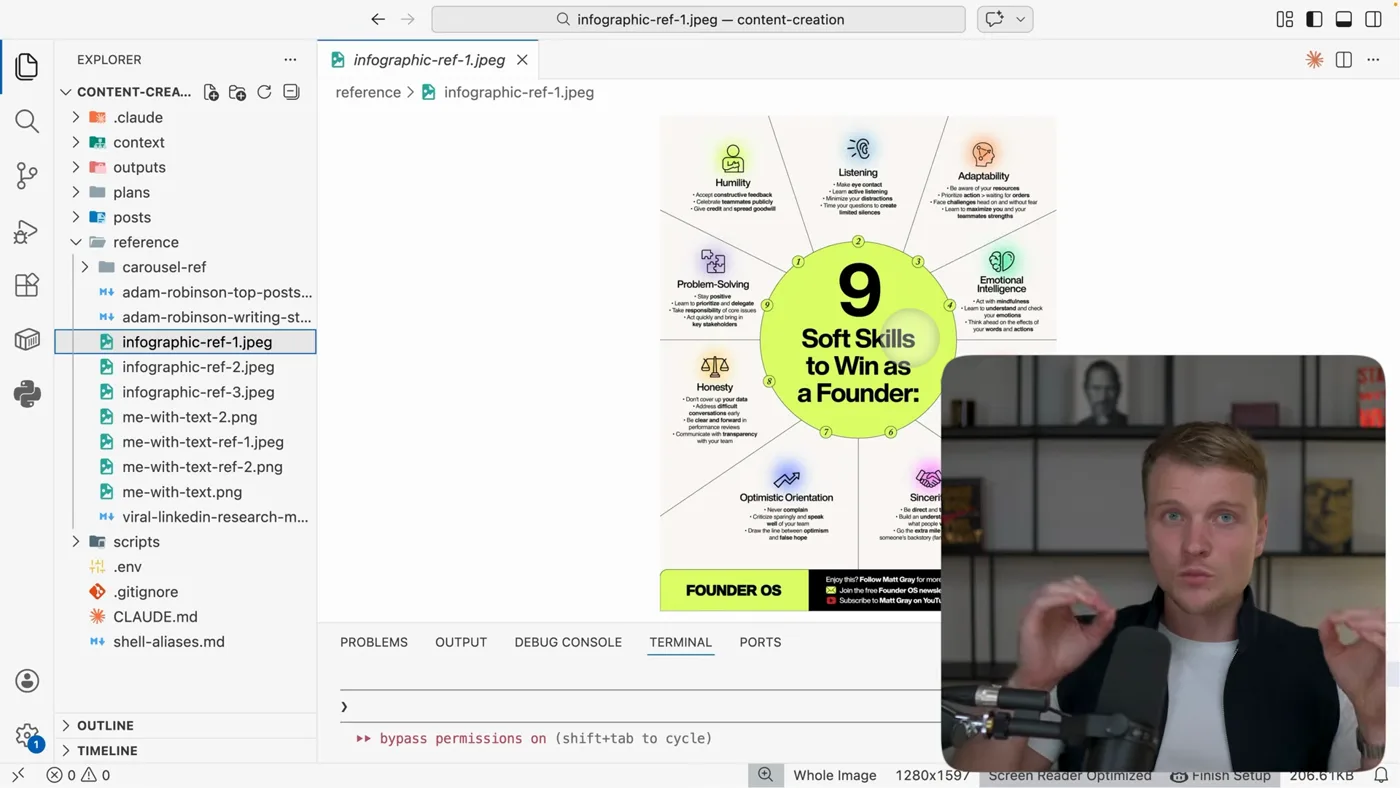
  5. 5Give it one style reference

    Put one image of the look you want into reference/. An infographic in your colours is enough: it takes the palette, the type and the general feel from that single picture.

    One good reference beats a page of description. The model is looking at the image.

  6. 6Run the command

    create 10 posts. It scrapes what is trending in your niche, writes each post, generates the visuals, and opens a dashboard when it is finished.

    My default mix is four posts with a personal photo, four infographics and two carousels. All of that is just words in the prompt: change the numbers, ask for videos instead, whatever you need.

The photo trick that makes it look like you

This is the detail people miss and it is worth its own section, because it is the difference between content that is obviously generated and content that looks like you made it.

Put one clear photo of your face in the images folder, named me.jpeg. Then ask Claude to rename everything else using it as the reference.

Two things happen. The model learns which person in a group photo is you, so it never picks an image where you are not the subject. And the filenames become descriptive, so when it writes a post about a move to a new city it can reach for the photo that fits instead of the first file in the folder.

The same idea, generally

Anything you want the system to use well needs a name it can reason about. IMG_4471.jpg is invisible. orange-sofa-laptop.jpg is a decision it can make.

You can see this working in the output. Every post comes with an image notes block underneath it, naming the exact file it chose and why:

## Image Notes
Personal photo: `oleg-selfie-at-desk-imac-night-city-lights-dubai-highrise.jpeg`
Vibe: casual, unpolished, matches the "imperfection" message.
Real desk, real setting, not a photoshoot.

And for a generated one it names the reference, the content and the style instead:

## Image Notes
AI infographic using `reference/infographic-ref-3.jpeg` (vertical flowing path).
Content: "From Voice to Published Post", vertical flow showing
Speak -> AI Processes -> Draft in Your Voice -> Quick Review -> Published.
Side-by-side time comparison: Old Way (90+ min) vs New Way (16 min).
Style: cream background, lime green accents, brand banner.

This is the part worth stealing even if you never use the project. A post and its image are one decision, so the system that writes the post should be the one that picks the picture, and it should have to say why.

The command, and how to change it

The whole interface is one sentence, and every part of it is yours to change:

create 10 posts:
4 with my personal images,
4 as infographics in the reference style,
2 as carousels.

base them on what is actually trending in my niche this week,
and make each one useful to my audience rather than about me.

Want video instead of stills? Say so. Want twenty? Say so. Want them written for LinkedIn rather than Instagram? Say so. There is no settings screen to learn, which is the point.

What it costs and how long it takes
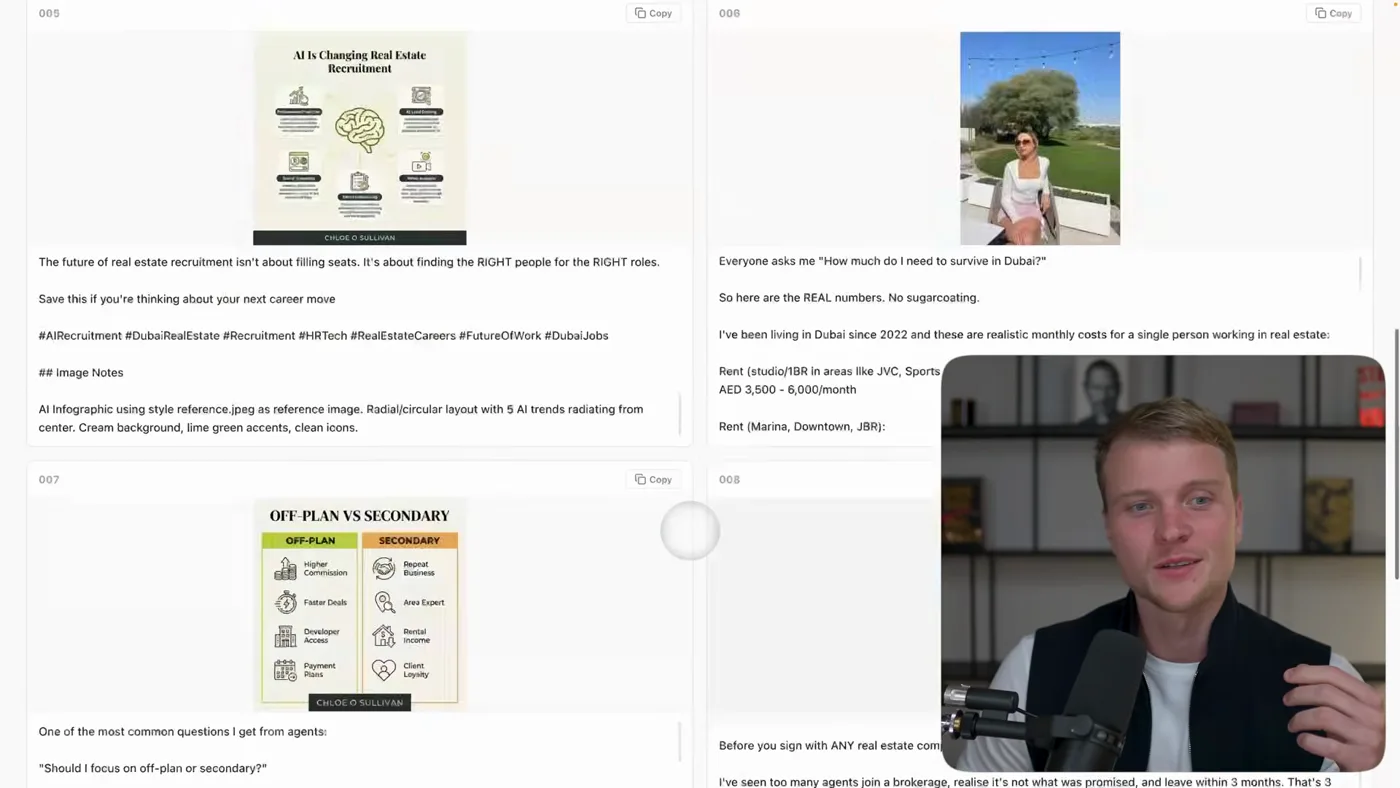
The end of one run: ten posts, each with its image, ready to schedule.
Claude plan
Pro, $20 a month
Apify
$5 of free credit a month, which covers normal use
Image generation
Cents per image, so a batch of ten is well under a dollar
First-time setup
Five to ten minutes
Learning your account
About six minutes, once
Each batch of ten posts
About 17 minutes, mostly image generation

What it does badly

  • It is not fast per post. Seventeen minutes for ten. Fine when you walk away, annoying if you sit and watch.
  • Skip the context step and it is generic. The whole value is in it having read your posts and your audience first.
  • One weak reference image poisons every visual. The infographics inherit whatever you put in that folder.
  • Ten drafts, not ten posts. Two or three will be genuinely good, most will need an edit, and one will be wrong about something. Read them.
  • It repeats itself across batches. Run it weekly and you will see the same angles. Tell it what you already published.

The research half of this, working out what to make rather than making it, is on The growth guide. The short-video versions are on Reels and TikTok. New to Claude Code? Start here.

If you get stuck

The things that actually go wrong, taken from the questions people ask under the video.

The terminal says “command not found: claude”

Installing the Claude Code extension in VS Code does not give you the Claude terminal command. The extension keeps a private copy for its own chat panel. That catches almost everyone, and it is not a broken setup.

To get the command, install Claude Code itself:

# macOS or Linux
curl -fsSL https://claude.ai/install.sh | bash

# Windows PowerShell
irm https://claude.ai/install.ps1 | iex

Then close the terminal window completely and open a new one. Skipping that is the second most common reason it still says not found. Check it worked with Claude --version.

Still not found on a Mac? Your PATH is missing the folder, so run these two lines:

echo 'export PATH="$HOME/.local/bin:$PATH"' >> ~/.zshrc
source ~/.zshrc

Claude doctor prints a full health report if you are still stuck. And if you would rather never touch a terminal, the Claude Code desktop app does the same job with buttons.

One thing worth knowing before you install anything: Claude Code needs a paid Claude plan (Pro or higher) or an API account. The free claude.ai plan does not include it, so it can install perfectly and still refuse to sign you in.

I typed “cr” and nothing happened, or it says command not found

cr is not a Claude command. It is a shortcut for a longer one, and three things go wrong with it.

It is lowercase. Terminals are case sensitive, so CR is a different word and will never be found.

A shortcut typed straight into a terminal dies when you close that window. To keep it, put the two lines in ~/.zshrc on a Mac, then run source ~/.zshrc.

On Windows, alias does not define anything. In PowerShell alias means Get-Alias, which is why you get ItemNotFoundException. Use functions instead:

function cs { claude "/prime" }
function cr { claude --dangerously-skip-permissions "/prime" }

To keep those permanently on Windows, run notepad $PROFILE and paste them in.

You never need the shortcut at all. Just run the thing it stands for:

claude --dangerously-skip-permissions "/prime"

And read which error you get, because it tells you which piece is missing. command not found: cr means the shortcut is not saved. command not found: Claude after typing cr means the shortcut is fine and Claude Code itself is not installed.

There is no .env file in the folder I downloaded

Correct, and on purpose. .env is where your private keys live, so it is deliberately kept out of the repo. A public folder with someone else's API keys in it would be a gift to whoever found it.

You create it yourself, once. The projects now ship a .env.example to copy:

# macOS or Linux
cp .env.example .env

# Windows PowerShell
Copy-Item .env.example .env

Or just make it by hand in VS Code: click the new file icon in the left panel and name it exactly .env, dot and all. Then paste your keys in, one per line, no quotes and no spaces around the =.

Put it in the project root, the folder that has CLAUDE.md in it, not inside app.

If you cannot see the file after making it, some setups hide files that start with a dot. It is there.

What does this actually cost to run?

Claude Code comes with a Claude subscription: Pro at $20/month, or Max from $100/month for five or twenty times the usage. Usage is included, there is no per-run charge. The free plan does not include Claude Code at all.

Inside Claude Code, /status tells you whether you are on a subscription or an API key, and /usage shows how close you are to your plan limit.

Prices and free tiers move. These were checked in August 2026.

Do I also need to pay for the API keys?

Yes, and it is a separate bill. Mixing the two up is what causes most of the confusion.

The API keys the pipelines use are pay per token, prepaid, and completely separate. A Claude subscription does not fund an API key.

The free tiers genuinely cover trying this out: Apify's free plan includes $5 of usage a month, and a scrape of a few dozen profiles costs cents. Google AI Studio has a free tier for the analysis.

Prices and free tiers move. These were checked in August 2026.

It says “credit balance too low, add funds”

That message is about the Anthropic API, which is prepaid pay per token. It is not about your Claude subscription, and a Pro or Max subscription never funds an API key. They are two different products with two different bills.

If you meant to use the API, add credit at platform.claude.com under Billing, and switch on auto reload so a long run cannot die halfway.

If you did not mean to use an API key, you probably have one sitting in your environment, and a key set there overrides your subscription login. Check with echo $ANTHROPIC_API_KEY on a Mac. If it prints something, remove it and run /login inside Claude Code to sign in with your subscription instead.

Questions people ask

How long does it take to generate 10 posts
About 17 minutes end to end, and most of that is generating images. The writing is fast. You start it, go and do something else, and come back to a dashboard with ten finished posts in it. Setup before your first run is another five to ten minutes.
Can it use my own photos in the posts
Yes, and this is the part that makes the output look like you rather than like stock. Put your photos in the context images folder with one clear face shot named me.jpeg, and ask Claude to rename them descriptively using that shot to identify you. It then picks a photo that fits each post instead of reaching for the first one.
Why not just use ChatGPT to write posts
Because a chat window cannot see what is trending in your niche this week, cannot generate the infographic, and cannot hand you a dashboard of finished posts. Claude Code calls a scraper for the trends and an image model for the visuals, and writes the output to files. The gap is not writing quality, it is that one produces text and the other produces posts.
How does it know what is trending in my niche
Through Apify, which has purpose-built scrapers for TikTok, Instagram, YouTube and Facebook. Claude Code calls them, reads what is performing right now, and writes from that. Asking Claude Code to scrape those sites directly does not work: the platforms block it, which is exactly why a service like Apify exists.
Will the posts sound like me
They start closer than you would expect, because the project reads your existing posts first, and they still need your pass. Treat the output as ten strong drafts with your topics and your evidence in them, not as ten things to publish. The time saved is in the blank page and the visuals, not in the final judgement.
What are the folders in the project for
They are the brain of the thing: context about you and your audience, reference images for the visual style, example copy worth imitating, and skills for specific jobs like writing hooks or building carousels. You never have to open them. They are what makes the chat interface produce something specific instead of something generic.
How much does it cost per batch of posts
A Claude plan at $20 a month covers the thinking and the writing. The variable cost is scraping and image generation, and it is small: Apify gives $5 of free credit a month and images are cents each. A batch of ten posts is well under a dollar of generation once you are set up.

Prefer the done-for-you version? Boldane turns one hour of talking a week into five LinkedIn posts, all from what you said. A real team does the crafting. You just approve.